Hullabalook Room Planner Integration
by Imran Nazir
A Case Study on Elevating Furniture Shopping with Typescript, AWS & Iframes
What if your online store could let customers design their dream living room before they buy? That’s exactly what we achieved for a leading e-commerce brand.
When a major e-commerce brand wanted to upgrade their customer journey, the goal was simple: create a richer, more interactive shopping experience that drives real conversions.
Partnering with Hullabalook (HBL)—experts in visual shopping tech—we pulled off a seamless integration that boosted product discovery and got users more engaged than ever.
Heads up: This article assumes you’ve got some working knowledge of AWS services.
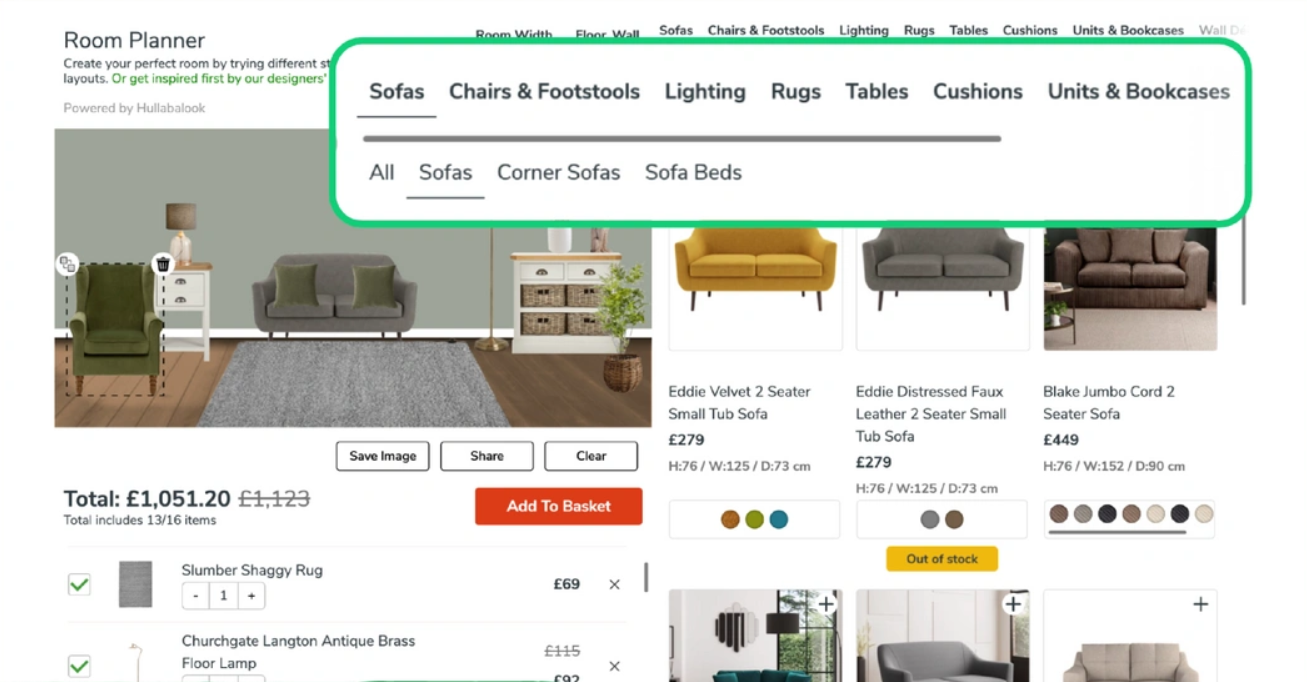
In this case study, I’ll take you behind the scenes of how we made it all happen—from the backend plumbing to the slick front-end user experience. This is the kind of fullstack, cloud-first development work I love delivering as a freelance developer.
The Challenge
Buying furniture online isn’t easy. Customers needed a better way to visualize what products would look like in their homes before hitting “Add to Basket.”
The solution? Room Planner (RP) by Hullabalook—an immersive, configuration tool.
The client wanted this powerful feature embedded into their site—but without slowing anything down or adding technical risk on the backend.
The Solution
We delivered the project in two parts:
- Backend: A pipeline to send Hullabalook fresh product data every day.
- Frontend: Embedding Hullabalook’s experience directly into the client’s category pages, and connecting it seamlessly to the shopping basket.
Building the Pipeline
First things first: Hullabalook needed product data.
The product catalogue (PC) lived on a SaaS platform we could access programmatically via API. Before we even got into formal planning, we whipped up a Node.js script to fetch the full catalogue and output it into a JSON file.
This early move paid off immediately:
- It let HBL start analyzing product taxonomy straight away.
- It helped us nail down what the final pipeline needed to look like.
Our goals for the pipeline were clear:
- Deliver a fresh drop of PC data to HBL once per day.
- Guarantee that the data matched a specific, pre-agreed TypeScript interface.

Instead of running expensive, always-on resources, we went serverless. We built an AWS Lambda function triggered by EventBridge on a daily schedule.
The Lambda pulled the latest product data, validated it, and posted it to an S3 bucket—all automatically. We even used Lambda’s temporary storage (/tmp) to manage the data file during execution before shipping it to S3. Zero servers. Minimal overhead and resource usage.
Beautifully simple.
Frontend: Embedding the Room Planner
Now for the fun part: plugging Hullabalook’s Room Planner directly into the client’s site.
The Room Planner was delivered via an iframe, embedded into specific category pages (e.g., Furniture). Inside that iframe, customers could drop products into a virtual room layout—and build their dream living room.
But there was a catch: how do you get the customer’s selected products out of the iframe and into the main site’s shopping basket?
Normally, for security reasons, scripts in one page can’t directly interact with another page’s scripts. Enter window.postMessage()—a neat, safe way for cross-origin communication.
Here’s a simplied example of how it worked:
From inside the iframe:
window.parent.postMessage({ productData }, "*");
On the parent page:
// listen for the message from the iframe, extract the product data
// and post it to the main sites backend to have it added to the shopping basket.
window.addEventListener("message", async ({ data }) => {
  await fetch("https://my-endpoint.com/graphql", {
    method: "POST",
    body: JSON.stringify(data),
    headers: { "Content-Type": "application/json" },
  });
});
Boom—seamless data transfer. Customers could easily add their curated “room” straight into their shopping cart.
Technical Highlights
- Security First: IAM roles with strict least privilege. S3 buckets locked down with tight access policies and smart lifecycle management.
- Performance Boost: The iframe was lazy-loaded to ensure no unnecessary load on initial page render.
- Effortless Scaling: Serverless architecture meant no servers to maintain—and no worries about scaling traffic.
The Results
- Increased average cart size among users who engaged with Room Planner.
- Improved bounce rates from product detail pages.
- Zero reported performance issues post-launch.
Final Thoughts
This project is a textbook example of how thoughtful fullstack development, backed by modern cloud infrastructure, can open up incredible new user experiences—without compromising speed, security, or scalability.
#aws, #lambda, #serverless, #typescript, #iframe, #case-study